 Our use of cookies
Commercial waste management software: How it works and who uses it
Commercial waste management software is a key component of large, complex, multi-stakeholder waste operations.
It centralises customer, operations, billing and compliance data into a single platform, driving the digital transformation of waste management to boost efficiency and accuracy.
This guide explains what commercial waste management software is, who uses it, how it works, the main types, and how to choose between them.
What is commercial waste management software?
Commercial waste management software is a platform used by waste firms and large organisations to track and optimise their waste operations.
It replaces disconnected paper-based processes and spreadsheets with integrated tools that connect the office, yard, operators, drivers and customers, so everyone works from the same information.
It is central to the digital transformation of waste management operations, allowing organisations to:
- Schedule and track collections in real time.
- Manage customer commercial waste contracts and service agreements in one place.
- Automate accurate, timely billing.
- Monitor containers, vehicles and other assets.
- Maintain compliance and duty of care records, such as waste transfer notes.
Who uses commercial waste management software?
It is primarily used by medium to large businesses across the waste life cycle, from large waste producers, to collection firms, recycling facilities, and waste brokers.
These businesses operate at a scale and complexity that benefits significantly from centralising data into a single platform.
The software is flexible, so each type of business applies it only to the part of the waste life cycle it is responsible for.
Typical organisations that implement these platforms include:
- Waste collection and carrier companies: Plan routes, manage contracts, track vehicles, and bill customers accurately for scheduled and on-demand collections.
- Recycling and materials recovery facilities: Track inbound tonnages, monitor material streams, and maintain the compliance records these processing activities demand.
- Skip and container hire companies: Keep tabs on a large, mobile pool of containers, including where each asset is and when it is due for exchange or collection.
- Waste brokers and dealers: Coordinate subcontractors, manage margins, and keep duty of care documentation in order, without carrying the waste themselves.
- Facilities management companies: Manage waste as one part of a wider service contract, with a single view of collections, commercial waste collection costs, and compliance across every client site.
- Large waste producers: Manage their own waste in-house to control costs, hit recycling targets, and evidence compliance across multiple sites.
How does commercial waste management software work?
The commercial waste management software performs different functions depending on the part of the waste life cycle it is working on and the reason it has been implemented.
The example below explains how commercial waste management works for a typical business waste collection firm:
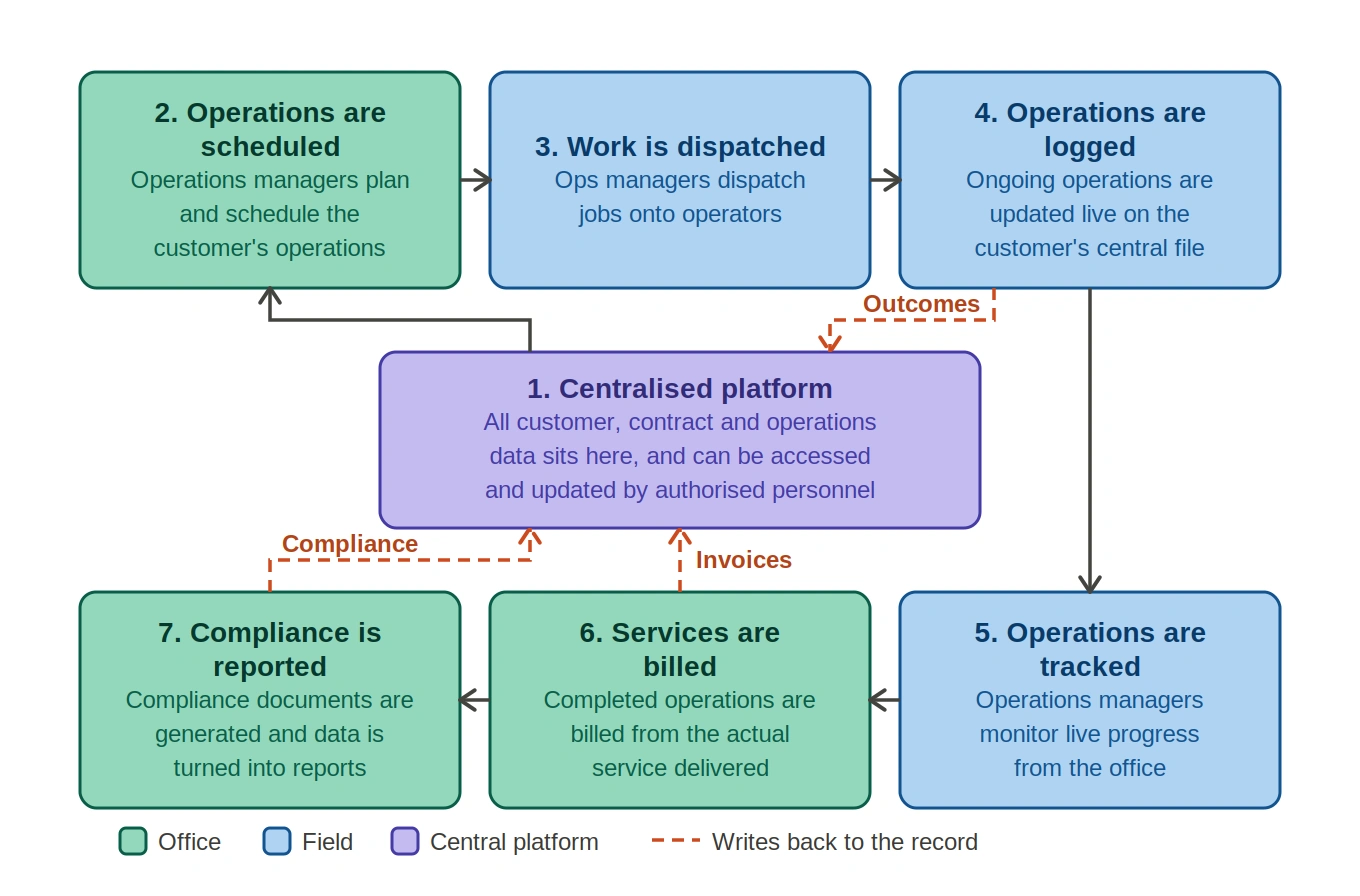
1. Centralised customer and contract data
The software is used to provide commercial waste services to customers, so having their data centralised in the platform is the foundation the rest of the system builds on. Their details, sites, agreed services, and pricing are recorded in one place.
This works as a CRM built specifically for waste operations, holding everything from the account manager to the agreed service level agreements (SLAs) against each customer.
Often, this data can be pulled directly from other enterprise systems via APIs, facilitating its quick implementation.
2. Operations are planned and scheduled
The system converts each contract into scheduled jobs, applying the agreed frequency, service type, and site details automatically.
For example, an operator running vehicles may group these jobs into optimised routes based on location, time windows, and vehicle capacity, to reduce mileage and idle time.
3. Work is dispatched to the field
Scheduled jobs are pushed to drivers and operators through a mobile app or in-cab device, typically synced in real time.
For example, a driver starting a round sees their assigned jobs in sequence, along with site-specific access notes and safety instructions, without needing physical paperwork.
When available, vehicle telematics then track GPS progress against the planned route as the round is carried out.
4. On-site activity is logged
As each job is completed, the outcome is logged against it, such as a completed lift, a missed bin, a contamination flag, or a weighed tonnage.
This capture is often automated. For example, a collection operator may use bin RFID tags that log each lift automatically, while onboard vehicle scales and weighbridges record the weight of every collection.
Photos, signatures, and GPS-stamped timestamps are recorded alongside it, creating a verifiable record of the service delivered.
5. The operation is tracked in real time
Field and telematics data sync back to the office instantly, giving the team a live view of progress rather than a retrospective one.
For example, if a bin is flagged as contaminated on site, the office can see it immediately and notify the customer, or adjust the route while the round is still in progress.
6. Services are billed
Completed jobs feed directly into the billing engine, so invoices are generated from the actual service delivered and the contracted rates.
For example, tonnage recorded at the weighbridge is linked to the customer account automatically, so weight-based charges are billed accurately without manual re-keying.
7. Compliance is recorded and reported
Every applicable job generates its compliance documentation, such as waste transfer notes, produced automatically from live collection and delivery data.
Drivers or site operators sign these digitally on a mobile device, and once signed they are stored in a secure online portal that customers can access at any time.
The system then aggregates operational data into reports covering cost, tonnage, recycling rates, and service performance.
What information does a waste management system hold?
A waste management system acts as the central database for the entire operation, with every record tied back to the customer it belongs to.
The information it holds falls into a few main categories:
- Customer and contract data: Business names, addresses, contact details, account managers, agreed pricing, service level agreements (SLAs), and contract start and end dates.
- Site and service data: The individual locations served under each contract, along with the waste streams handled, collection days, and frequencies at each one.
- Container and asset data: Bin and container types, sizes, quantities, and placement details, plus the vehicles and equipment used to service them.
- Operational data: Live and historical records of collections, including dates, times, weights, missed bins, and contamination flags captured on site.
- Compliance and document data: Waste transfer notes, duty of care records, and other issued documents, stored against the relevant customer and site.
- Financial data: Invoices, payment records, and the charges generated from the actual services delivered.
Types of waste management software and how to choose the right one
There are various types of waste management software, ranging from broad platforms that run an entire operation to narrow tools built for one specific operation, so the right choice depends largely on what kind of system applies to the business.
Below we delve in the details:
Types of waste management software
Most systems fall into one of three broad groups:
End-to-end platforms
Examples: AMCS, Waste Logics, ISB Global
All-in-one systems that manage the whole operation, from customer contracts and scheduling through to field capture, billing, and compliance. These suit operators who want a single centralised management platform.
Specialist tools
Examples: Routific (route optimisation), Enevo (smart-bin and fill-level monitoring), Coast (fleet maintenance)
Systems built to do one function well, such as route optimisation, smart-bin and fill-level monitoring, fleet maintenance, or billing.
Sector-specific systems
Examples: cieTrade (recycling and scrap trading), Cority (hazardous and clinical waste), Leanpath (food waste)
Software tailored to a particular waste stream or part of the life cycle, such as commercial recycling and scrap trading, hazardous waste collection, hospital waste collection, or commercial food waste collection. These are shaped around the compliance and material-handling demands of that niche.
How to choose the right waste management software
While most organisations already know what type of software is necessary based simply on their needs, they still need to decide which one to choose:
- Understand the software requirements Take inventory and map the waste operations to understand where software needs to fit. The output is a list of requirements and number of licenses necessary for the procurement team to start contacting software providers.
- Check compliance and billing flexibility: Much of waste management comes down to compliance with commercial waste regulations. Confirm the system produces the necessary documentation, such as waste transfer notes, and that it can handle the necessary billing structure, such as fixed contracts or weight-based pricing.
- Review operational fit: Software comes at different levels of complexity. The system needs to be intuitive and have the necessary operations features, such as integration with vehicle GPS, Bin ID tags, etc.
- Confirm integrations: Establish whether the platform connects to existing systems, such as a CRM, ERP, or accounting software, and how data moves between them.
- Data protection: As with all software procurement, clarify who owns the data and how easily you can export it if you ever switch providers, and check how the system secures sensitive information and controls what each type of user can see and do.
What are the main features of commercial waste software?
Most commercial waste platforms share a core set of features:
- Customer and contract management: Keeps customer details, sites, services, and pricing in one place.
- Scheduling and route optimisation: Turns contracts into scheduled jobs and plans efficient collection routes.
- Mobile field app: Lets drivers see jobs and log outcomes, weights, and photos on site.
- Container and asset tracking: Records where commercial waste bins, containers, and vehicles are and their current status.
- Weighbridge and tonnage tracking: Captures collection weights against the right customer account.
- Billing and invoicing: Generates invoices from completed jobs and contracted rates.
- Compliance and document management: Produces and stores records such as waste transfer notes.
- Reporting and analytics: Pulls operational data into reports on cost, tonnage, and performance.
Implementing commercial waste management software
Implementing a new system is always an IT undertaking, with the process typically running over a few weeks to a few months, regardless of scope.
It involves migrating customer, contract, and asset data into the new system, configuring it to match your operations, integrating it with any existing tools, training the people who will use it, and often purchasing and setting up new hardware.
The specifics are outside the scope of this article, but a few principles of success consistently make the difference. Success hinges on:
- Data quality: Clean, accurate data migrates well, whereas messy or duplicated records carry those problems straight into the new system.
- Involving users: Bringing in drivers and office staff early surfaces the practical details that make or break daily use.
- Phased rollouts: Rushing the switch, or launching every feature at once, tends to cause more problems than a measured rollout.
- Continuous ownership: Someone needs to own the system once it is live, to handle issues, refine it, and keep it working as the operation changes.
How commercial waste management software improves business performance
The more stakeholders, complexity and scale of the waste management operations, the more beneficial the use of a centralised system becomes. When implemented successfully across these environments, it improves the following measurable KPIs:
- Lower operating costs: Optimised routes cut fuel, mileage, and vehicle wear, while automation reduces the admin hours spent on scheduling, paperwork, and data entry.
- Stronger cash flow: Billing generated straight from completed jobs means invoices go out faster and more accurately, reducing disputes and the revenue lost to missed or under-charged work.
- Better use of assets: Tracking every bin, container, and vehicle shows what is where and how it is used, so assets are recovered, reallocated, and serviced rather than lost or left idle.
- Improved compliance: Producing and storing records such as waste transfer notes automatically reduces the risk of penalties and makes audits straightforward rather than stressful.
- Greater visibility: Real-time data and reporting give managers an accurate picture of the operation, so decisions are based on what is actually happening rather than guesswork.
- Improved customer experience: Accurate scheduling, reliable collections, and self-service access to documents and invoices make the service easier to deal with and easier to retain.
 Back to blog
- Share: